

Security teams often find themselves drowning in alerts, a situation exacerbated by the sheer volume of vulnerabilities detected in cloud environments. Tools like Wiz, Orca Security, Sentinel One Singularity, and Prisma Cloud excel at identifying problems but often leave the remediation to overstretched DevOps teams. This creates a critical lag between detection and actual fix, leaving cloud assets exposed. The numbers are clear: vulnerability management slowed by 22%, increasing from 230 to 282 days to close. That's a significant improvement that's going in the wrong direction and leaves organizations susceptible to breaches.
Moving from vulnerability detection to production-safe patching automation requires a structured, intelligent approach, not just more tools. It means shifting remediation left, ensuring fixes are applied without breaking application functionality or introducing new risks. This guide explores how to build and implement a robust automated patching strategy for cloud vulnerabilities, focusing on actionable steps and real-world considerations.
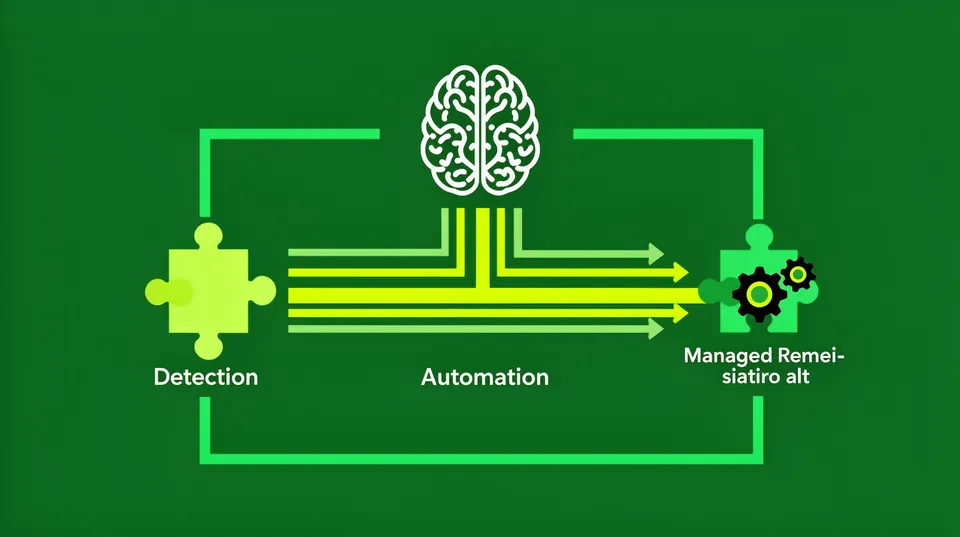
Organizations need to bridge the gap between identifying security issues and resolving them. This is where a platform like Tamnoon comes in, providing the orchestration layer that connects security insights with operational execution, reducing mean time to remediation (MTTR) effectively.
Understand Your Cloud Vulnerability Landscape
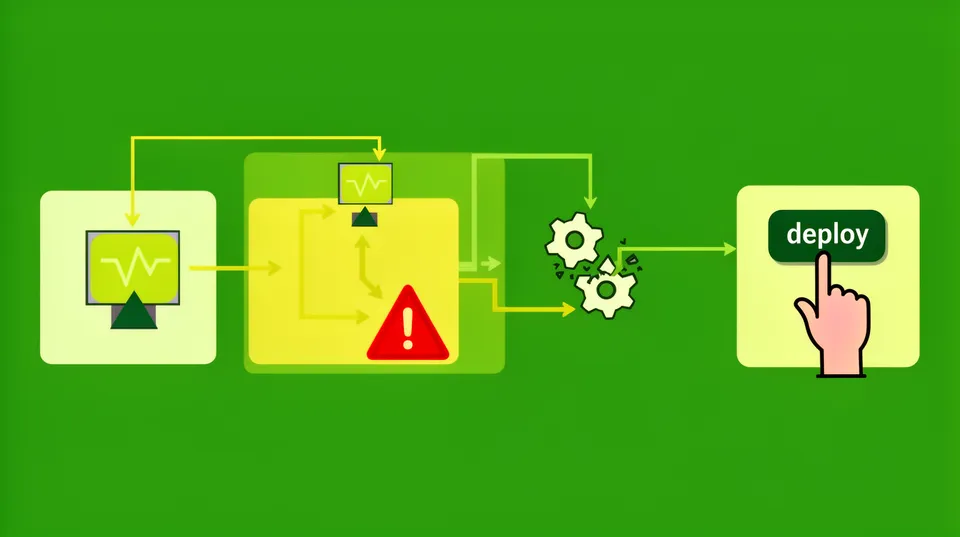
Before automating anything, you must have a clear picture of what you're up against. Cloud environments change constantly, making a static understanding quickly obsolete. Organizations generate many security alerts, yet 53% of CNAPP detections remain open, with 6.3% of those touching a Crown Jewel asset. This shows a clear need for faster, more effective remediation.
Prioritize Vulnerability Detection and Context
Your existing Cloud Native Application Protection Platforms (CNAPPs) or Cloud Security Posture Management (CSPM) tools are the starting point. Tools like AWS Security Hub, Azure Defender for Cloud, Wiz, and Orca provide visibility into various vulnerabilities. The critical next step isn't just about finding more. It's about adding context. Not all vulnerabilities are created equal. A publicly exposed S3 bucket with sensitive data is an immediate critical risk, while an outdated library in a development environment might have a lower priority.
Contextualization involves mapping vulnerabilities to:
- Asset criticality: Does this asset support a production workload, process sensitive data, or handle financial transactions?
- Exploitability: Is there a known exploit in the wild?
- Reachability: Is the vulnerable asset directly exposed to the internet or only accessible internally?
- Data sensitivity: What kind of data resides on or passes through the vulnerable asset?
This risk-based prioritization helps you focus your automation efforts where they have the most impact. Remember, 2025 saw 48K+ CVEs published (21% YoY growth), 193K malware packages, and time-to-exploit collapsed to just 5 days. You can't fix everything manually.
Integrate Detection with Remediation Platforms
For true automation, your detection tools must feed directly into a remediation platform. Tamnoon, for instance, integrates with various CNAPPs and security tools to ingest alerts. This integration is typically done via API webhooks, SQS queues, or direct API calls. You'll set up connectors to pull vulnerability data, including CVE IDs, affected resources, severity, and associated metadata. An example using a hypothetical webhook from a CSPM to a remediation platform might look like this:
POST /api/v1/remediation/alerts
Content-Type: application/json { "alert_id": "cspm-alert-12345", "source": "Wiz", "severity": "Critical", "resource_type": "AWS::EC2::Instance", "resource_id": "i-0abcdef1234567890", "region": "us-east-1", "vulnerability_id": "CVE-2026-XXXX", "description": "Outdated operating system kernel detected", "recommendation": "Upgrade kernel to version X.Y.Z", "tags": {"environment": "production", "application": "frontend"}
}
This standardized intake ensures all necessary information for a potential fix is available. It moves beyond raw alerts to structured, actionable events.
Design Production-Safe Playbooks for Patching
Automating patching can be risky. A botched patch can bring down critical services, making a bad situation worse. This is why Tamnoon emphasizes production-safe playbooks, often incorporating human-in-the-loop validation for complex scenarios. You need to define specific, repeatable workflows for common vulnerability types.
Map Vulnerabilities to Remediation Actions
Each type of vulnerability detected requires a corresponding remediation action. These actions should be codified into playbooks. For example:
- Outdated OS/Application Packages: Update packages using OS-native package managers (apt, yum, dnf) or container image rebuilds.
- Misconfigured Security Group/NACL Rules: Modify ingress/egress rules to restrict access.
- Exposed Storage Buckets (S3, Azure Blob, GCP Cloud Storage): Adjust bucket policies, block public access.
- Outdated IAM Policies: Refine IAM permissions to adhere to least privilege.
These playbooks aren't just scripts. They include pre-checks, rollback mechanisms, and post-remediation validation. For instance, automated remediation playbooks are essential for maintaining uptime in cloud environments.
Build Idempotent and Reversible Remediation Scripts
Your remediation scripts must be idempotent, meaning running them multiple times produces the same result without unintended side effects. They also need to be reversible. If a patch causes an issue, you must be able to roll it back quickly. Infrastructure as Code (IaC) is crucial here. Tools like Terraform and CloudFormation allow you to define your desired state, making changes and rollbacks more predictable.
Example: Patching an EC2 instance kernel
Let's say a critical Oracle patch for CVE-2026-35273 is released. A playbook for this might involve:
- Identify affected instances: Query your inventory system (e.g., AWS Systems Manager Inventory, CMDB) for instances running the vulnerable kernel version.
- Snapshot instances: Create EBS snapshots of the affected instances as a rollback point.
- Apply patch: Use an orchestration tool (e.g., AWS Systems Manager Run Command, Ansible) to execute kernel updates.
- Reboot instance: Required for kernel changes. Implement a staggered reboot strategy for production to minimize downtime.
- Validate: Post-remediation checks to ensure the service is running, the patch is applied, and no new issues are introduced.
- Rollback (if needed): If validation fails, terminate the instance and restore from the snapshot, or revert the kernel package.
# AWS Systems Manager Run Command example (pseudo-code)
aws ssm send-command \ --instance-ids "i-0abcdef1234567890" \ --document-name "AWS-RunShellScript" \ --parameters commands="sudo apt update && sudo apt upgrade -y linux-image-aws" \ --comment "Patch kernel for CVE-2026-XXXX"This structured approach minimizes risk and maximizes the success rate of automated patching. Even large enterprises like Oracle issue monthly security updates, sometimes delivering 245 patches, making manual processes unsustainable.
Implement an Orchestration Layer for Remediation
A dedicated remediation orchestration platform manages the lifecycle of a vulnerability from detection to resolution. It's the brain connecting your detection tools to your operational tools for remediation.
Centralize Remediation Workflow
Tamnoon acts as this central orchestration layer. It ingests alerts from sources like Wiz, Orca, Prisma Cloud, or native cloud security services. The platform then:
- Normalizes alerts: Consolidates data from different sources into a unified schema.
- Prioritizes: Applies risk context to determine remediation urgency.
- Triggers playbooks: Matches the vulnerability type to the appropriate remediation playbook.
- Executes actions: Uses existing cloud-native tools (AWS Systems Manager, Azure Automation) or IaC tools (Terraform, CloudFormation) to apply fixes.
- Validates: Confirms the fix was successful and didn't introduce new problems.
- Closes alerts: Updates the original detection tool, providing full closed-loop remediation.
This centralized control helps eliminate alert fatigue and manual hand-offs. Without this orchestration, over 80% of organizations that miss a 24-hour patch window report security incidents involving known vulnerabilities.
Incorporate Human-in-the-Loop for Complexities
Not everything can or should be fully automated. Complex or high-risk remediations, especially those impacting critical production services, benefit from a human review. Tamnoon's AI-powered remediation can generate proposed fixes, but for truly sensitive changes, human experts might validate the generated code or intervention plan. This allows for fine-tuning, assessing potential blast radius, and ensuring alignment with specific business continuity requirements. This hybrid approach offers speed and safety.
Example: Validating an IAM policy update
Changing an IAM policy could inadvertently revoke access for an application, causing an outage. A human-in-the-loop step would allow a security architect to review the proposed least-privilege policy. The process might look like this:
- Tamnoon detects an overly permissive IAM policy.
- AI generates a refined, least-privilege policy.
- The proposed policy and its potential impact are presented to a human for review.
- The human approves or modifies the policy.
- Upon approval, Tamnoon applies the change.
- Post-remediation tests confirm application functionality.
This ensures that fixing overprivileged IAM roles doesn't cause unintended disruptions.
Continuously Monitor and Refine Your Automation
Automation isn't a set-it-and-forget-it solution. Cloud environments, threat landscapes, and application requirements evolve. Lowering MTTR is critical, and continuous improvement drives this.
Establish Performance Metrics and Reporting
You can't manage what you don't measure. Key metrics for automated patching include:
- Mean Time to Remediate (MTTR): How quickly are vulnerabilities being fixed from detection?
- Patching success rate: Percentage of automated patches that complete without error or rollback.
- Number of manual interventions: Identifies areas for further automation.
- Cost savings: Quantifies reduced manual effort.
Tamnoon's reporting capabilities provide real-time visibility into these metrics, helping teams continuously visualize and measure cloud security remediation efforts. This data informs where to invest more automation and where to refine existing playbooks. For example, SoftBank rolled out AI-powered 'patching as a service', demonstrating the industry's shift towards measured, automated remediation.
Regularly Exercise and Update Playbooks
New vulnerabilities emerge daily. Anthropic, for example, was patching dozens of newly discovered security vulnerabilities in Claude Code between April and early June 2026. Your playbooks must keep pace. Schedule regular reviews and updates for your remediation playbooks, especially when there are changes in your cloud architecture, application stack, or compliance requirements. Conduct periodic “fire drills” to test the effectiveness and resilience of your automated patching processes. This practice helps identify blind spots and areas for improvement before a real incident occurs.
Integrate with CI/CD Pipelines
The closer you integrate automated patching into your CI/CD pipelines, the more effectively you can prevent vulnerabilities from reaching production. This 'shift-left' approach involves implementing security checks and automated remediation steps during development and deployment phases. For example:
- Image scanning: Use tools to scan container images for known vulnerabilities before deployment. If critical vulnerabilities are found, the build can fail, or an automated process can trigger a rebuild with patched base images.
- IaC scanning: Scan Terraform or CloudFormation templates for misconfigurations before resources are provisioned. Automated remediations can correct non-compliant settings before they're deployed.
48% of the DevSecOps market is driven by cloud-native applications, and 28% by secure CI/CD automation, showing the growing importance of integrating security into developer workflows. This proactive stance reduces the attack surface significantly and reduces the need for reactive patching.
Learn from Incidents
Each security incident, even a minor one, is an opportunity to improve. For example, recent reports of Apple patching a Beats eavesdropping flaw or Cisco patching another vulnerability highlight the constant need for vigilance. After any security incident or even a failed automated patch attempt, conduct a post-mortem. Analyze what went wrong, update your playbooks, and adjust your automation strategy. This feedback loop is essential for continuous improvement.
Automating cloud vulnerability patching isn't just about speed. It's about making security operations more reliable, less error-prone, and ultimately, safer for production environments. By adopting a structured approach that combines intelligent orchestration, production-safe playbooks, and continuous refinement, organizations can significantly reduce their attack surface and improve their security posture. Reduce your MTTR by automating remediation with Tamnoon.

Tamnoon helps security teams remediate cloud risks faster with AI-augmented managed services — combining human expertise with automation so nothing falls through the cracks.
Learn more at tamnoon.ioFAQs
Why is cloud vulnerability patching automation critical?
Cloud vulnerability patching automation is critical due to the sheer volume and velocity of new vulnerabilities, combined with the rapid pace of cloud deployments. Manual processes can't keep up with the scale and dynamic nature of cloud environments. For instance, <a href="https://mondoo.com/vulnerability-intelligence/state-of-vulnerabilities-2026">2025 saw over 48,000 CVEs published, and the time-to-exploit for vulnerabilities is now often just five days</a>. Automation helps organizations reduce their Mean Time to Remediate (MTTR), minimize human error, and ensure consistent application of patches, directly impacting their ability to prevent security incidents and maintain business continuity. Without it, critical assets remain exposed for extended periods.
What are the biggest risks of automating cloud patching?
The biggest risks of automating cloud patching typically revolve around breaking production environments. An improperly designed or executed automated patch can lead to application downtime, data corruption, or even new security vulnerabilities. For example, an automated script that applies a patch without proper pre-checks, validation, and rollback mechanisms could inadvertently cause service outages. This is particularly true for complex systems or those with many interdependencies. It's why solutions like Tamnoon emphasize 'production-safe playbooks' and often incorporate 'human-in-the-loop' steps for high-risk changes, ensuring reliability and minimizing blast radius.
How do you ensure automated patches don't break production?
Ensuring automated patches don't break production involves several key strategies. First, design idempotent and reversible remediation scripts, often leveraging Infrastructure as Code (IaC) for predictable state management. Second, implement extensive pre-remediation checks to assess the target environment and potential impacts. Third, use staged deployments and canary releases, applying patches to non-production environments first, then gradually to production. Fourth, incorporate robust post-remediation validation to confirm service availability and functionality. Finally, for critical or complex changes, human-in-the-loop approval processes add an essential layer of oversight. These combined measures validate changes before and after deployment, significantly reducing risk.
What role do CNAPPs and CSPMs play in this automation process?
CNAPPs (Cloud Native Application Protection Platforms) and CSPMs (Cloud Security Posture Management) are foundational to automated patching. They primarily serve as the detection layer, identifying vulnerabilities, misconfigurations, and compliance deviations across the cloud environment. Tools like Wiz, Orca, and Palo Alto Cortex Cloud generate the alerts. The remediation process then consumes these alerts. An effective automation strategy integrates these detection tools with a remediation orchestration platform, which then normalizes and prioritizes the findings, triggering the appropriate automated patching playbooks. Without the comprehensive visibility provided by CNAPPs/CSPMs, the remediation system wouldn't know what to fix.
What is the 'human-in-the-loop' concept for cloud remediation?
The 'human-in-the-loop' concept for cloud remediation involves integrating human oversight and approval at specific, critical points within an otherwise automated workflow. While AI-powered remediation can generate remediation actions and even execute simpler fixes, there are scenarios where human expertise is invaluable. For example, a proposed change to a highly sensitive IAM policy or a core network configuration might require a security architect or a senior DevOps engineer to review and approve the generated fix before it's applied in production. This approach balances the speed and efficiency of automation with the nuanced judgment and risk assessment capabilities that only a human can provide, especially when the potential blast radius of an incorrect fix is large.