

Finding exposed AWS credentials on public websites is a critical incident that demands immediate and precise action. These aren't just theoretical risks. They represent direct attack vectors that threat actors actively exploit. The challenge lies not just in detection, but in efficiently and safely remediating these exposures without causing outages or further complications.
Organizations often struggle with the sheer volume of security alerts, a phenomenon known as alert fatigue. While tools like Wiz, Orca Security, and Prisma Cloud excel at identifying these exposures, translating those alerts into production-safe fixes requires a specialized approach. This is where a focus on remediation becomes paramount. It's about moving beyond identifying what's broken to actually fixing it in a secure and controlled manner.
The impact of publicly exposed AWS credentials ranges from data exfiltration to full account takeover. For instance, an exposed AWS key allowed attackers to map an environment and seize administrative control in minutes. This isn't a hypothetical. It's a documented incident illustrating the immediate and severe consequences. Addressing these exposures requires a clear understanding of the blast radius, precise remediation steps, and robust verification mechanisms.
Detecting Exposed AWS Credentials
Before remediation can occur, you must accurately detect exposed credentials. This requires constant vigilance across various vectors, both internal and external. Credentials don't just appear on public sites. They often leak from development environments, forgotten S3 buckets, or poorly configured CI/CD pipelines.
External Monitoring for Leaked Secrets
External surface scanning tools are essential for discovering credentials posted to public repositories, Pastebin, code-sharing sites, and even public-facing web servers. Services like GitGuardian, Cycode, and SpectralOps continuously monitor these external sources. They use heuristics and machine learning to identify patterns indicative of AWS access keys, secret keys, session tokens, and even connection strings with embedded credentials. These tools integrate with your existing security ecosystem, pushing alerts to your security information and event management (SIEM) system or directly to your cloud security posture management (CSPM) platform like AWS Security Hub or Microsoft Defender for Cloud.
Configuration of these tools involves defining specific regex patterns for your organization's AWS account structures, ensuring they don't just look for generic AWS keys but contextually relevant ones. Regular expression patterns for AWS access keys usually follow a specific format like AKIA[0-9A-Z]{16}, while secret keys are typically 40 characters long and Base64 encoded. Setting up webhooks and API integrations means that as soon as a potential leak is detected, an alert is generated, initiating the response process. This proactive external monitoring complements internal security controls by catching leaks that might bypass internal visibility.
Internal Discovery of Misconfigured Resources
Internal discovery often involves CSPMs and Cloud Workload Protection Platforms (CWPPs) like Orca Security, Wiz, or Palo Alto Cortex Cloud. These platforms analyze your cloud infrastructure for misconfigurations that could lead to credential exposure. For example, a publicly readable S3 bucket might contain an unencrypted .env file with AWS credentials. Palo Alto Unit 42 discovered a large-scale campaign siphoning API keys and access tokens from exposed .env files in Amazon Web Services (AWS). This highlights the real-world impact of such seemingly minor misconfigurations.
Tools like AWS Config provide continuous monitoring of your resource configurations, alerting you when a resource deviates from a defined security baseline. For example, you can set up an AWS Config rule to detect S3 buckets that are publicly accessible. When such a rule is violated, it flags the resource, enabling your security team to investigate and remediate. Similarly, Amazon GuardDuty monitors for suspicious activity, which can indicate compromised credentials, while AWS CloudTrail logs API calls, providing an audit trail that can help pinpoint when and how credentials might have been used after exposure. Integrating these native AWS services with a centralized platform like Tamnoon allows for a unified view of security posture and streamlined workflows for remediation.
Verifying the Exposed Credentials
Before initiating any remediation, verify the credential's validity and blast radius. An inactive key requires a different response than an active one with broad permissions. This validation step prevents unnecessary disruption and prioritizes efforts.
Checking Credential Validity and Permissions
Once you detect a potential leak, the immediate next step is to confirm if the credentials are still valid. You can do this by attempting to use them in a controlled environment, such as a temporary EC2 instance or an isolated network segment, to execute a benign AWS API call. For example, try listing S3 buckets or describing EC2 instances. don't try to access sensitive resources. If the call succeeds, the credentials are live.
To determine the permissions associated with the exposed credentials, use AWS CLI commands with the exposed keys. Specifically, aws sts get-caller-identity to confirm the IAM user or role, and then use aws iam simulate-principal-policy to understand the permissions attached to that identity. This command simulates API actions and shows whether the principal is authorized to perform them. For instance, to check S3 read access:
aws iam simulate-principal-policy \ --policy-source-arn arn:aws:iam::123456789012:user/compromised-user \ --action-names s3:GetObject s3:ListBucket \ --resource-arns arn:aws:s3:::* \ --query 'EvaluationResults[?EvalDecision==`Allowed]'This output tells you exactly what the exposed key can do, which directly informs your remediation strategy and helps determine the potential blast radius. Understanding the full scope of allowed actions is critical, since most secrets exposed since 2022 remain valid in 2025, exposing cloud systems to long-term attacks.
Assessing Blast Radius
The blast radius defines the maximum potential damage an exposed credential could cause. This involves more than just the permissions. It encompasses the resources accessible through those permissions and any trust relationships. To understand the potential impact, consider what resources are directly accessible, what other roles or services the compromised identity can assume, and what data it can read, write, or delete. A key with AdministratorAccess is clearly worse than one with read-only access to a non-critical S3 bucket, but even the latter can sometimes be escalated. An Amazon Web Services engineer had personal identity exposed credentials on GitHub, illustrating how even an internal exposure can lead to mapping a larger environment.
Map out all dependent services and data types. Are there critical databases, sensitive customer data, or production environments within reach? Tools like Wiz and Orca Security often provide graph-based representations of your cloud environment, helping to visualize these attack paths and identify the true blast radius. This step is about determining the true risk, not just confirming a leak. It dictates the urgency and scope of your response.
Remediation Strategies for Exposed AWS Credentials
Once detected and verified, remediation must be swift and deliberate. The goal is to revoke access, clean up the exposure, and prevent recurrence, all while minimizing disruption.
Rotating or Revoking Compromised Access Keys
The primary action is to invalidate the exposed key. For IAM user access keys, this means rotating the key. In the AWS Management Console, navigate to IAM, then Users, select the affected user, go to the Security credentials tab, and click "Create access key." This generates a new pair. Immediately deactivate or delete the old exposed key. For AWS CLI:
aws iam create-access-key --user-name CompromisedUser
aws iam update-access-key --access-key-id KEY_ID_OF_EXPOSED_KEY --status Inactive --user-name CompromisedUser
aws iam delete-access-key --access-key-id KEY_ID_OF_EXPOSED_KEY --user-name CompromisedUser
This deactivates and then deletes the old key. For temporary security credentials (session tokens), revoke them using aws iam deactivate-mfa-device if an MFA device is associated, or by revoking active sessions. For AWS applications, if you suspect hardcoded keys, initiate an emergency code deployment to remove them and then invalidate the exposed credentials for the affected IAM role. This rapid response is critical because the longer a key is active, the more damage it can cause.
Cleaning Up Public Exposures
Removing the sensitive information from public websites is equally critical. If the credentials were found on GitHub, Pastebin, or a public S3 bucket, you must initiate content removal. For GitHub, this means contacting GitHub Support for a DMCA takedown request or using their secret scanning alerts to automate revocation. For self-hosted public websites, delete the file or repository containing the credentials. If it's a code repository, a forced push that removes the sensitive commit history might be necessary, though this can disrupt team workflows. Engage the relevant platform's support immediately. Don't assume that simply changing the credentials is enough. The exposed data itself remains a risk, and threat actors might still harvest it for future attempts or use it as intelligence.
This cleanup also extends to any caches or logs where the exposed credential might reside. Ensure that any build artifacts, CI/CD logs, or deployment logs are purged if they contain the plaintext credential. This prevents internal re-exposure.
Implementing Production-Safe Remediation through Orchestration
Manual remediation of credential exposure carries significant risk of production impact. What if you rotate a key that's still actively used by a legacy application you didn't know about? This is where Tamnoon's platform comes in. It orchestrates changes with production-safe remediation playbooks. These playbooks are pre-tested workflows that handle the complexities of key rotation, service restarts, and application updates in a controlled manner.
The process starts with Tamnoon's AI-Powered Remediation engine. It ingests an alert from your CSPM (e.g., Wiz, Orca, Tenable.cs) about an exposed key. The AI analyzes the context: the IAM user, the permissions, the associated resources, and application dependencies. It then proposes a remediation plan, which might include:
- Generate new access keys for the affected IAM user.
- Update all identified services, applications, and environments that use this key with the new credentials. This often involves updating environment variables, secret managers (like AWS Secrets Manager or HashiCorp Vault), or configuration files.
- Gracefully restart or redeploy affected applications to ensure they pick up the new credentials.
- Deactivate the old, exposed access key.
For more complex or critical scenarios, Tamnoon incorporates a Human-in-the-Loop (Expert-led) validation process. Before executing, a cloud expert or the affected application owner reviews the proposed changes within the platform. This step ensures that the automated remediation won't break production, particularly for edge cases or undocumented dependencies. If validation passes, the Production-Safe Playbooks execute the remediation automatically, typically integrating with change management systems and providing rollback capabilities if anything unexpected occurs.
This approach significantly reduces Mean Time To Remediation (MTTR) by automating much of the operational burden, while the explicit validation step prevents accidental outages caused by unverified changes. It's recognizing a problem and fixing it without creating a new one.
Preventing Future Exposure
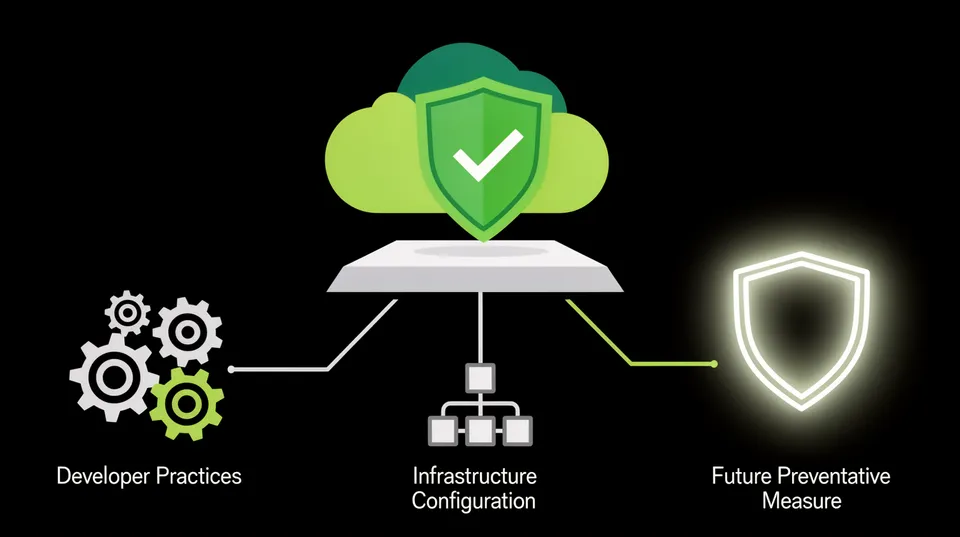
Remediation is only part of the solution. Long-term security requires preventing similar incidents. This involves a multi-faceted approach addressing developer practices, infrastructure configuration, and automated enforcement.
Automated Secret Management and Rotation
Hardcoding credentials or storing them in plain text is a common root cause of exposure. Solutions like AWS Secrets Manager, HashiCorp Vault, or Azure Key Vault should be mandatory for all applications. These services encrypt and centralize secrets, providing secure retrieval mechanisms. Implement automated secret rotation where possible. AWS Secrets Manager, for example, can automatically rotate database credentials and API keys without developer intervention. This means even if a secret is momentarily exposed, its lifespan is short, limiting its utility to an attacker.
For developer workflows, integrate secret management directly into CI/CD pipelines. Tools like Jenkins, GitLab CI, or GitHub Actions can fetch secrets from a vault at runtime, ensuring credentials are never exposed in source code or build artifacts. This requires a cultural shift towards principle of least privilege for secrets and away from static, long-lived credentials.
Code Scanning and Pre-Commit Hooks
Shift-left security practices are crucial. Integrate secret scanning into your development pipeline from the earliest stages. Tools like GitGuardian, Trivy, or Snyk can scan code repositories for hardcoded credentials before they're committed or pushed. Use pre-commit hooks that automatically check for common secret patterns, preventing developers from pushing sensitive information to Git. For example, a pre-commit hook using detect-secrets` can abort a commit if it finds a pattern that looks like an AWS access key. This s developers to fix issues themselves before they become a production security incident.
Enhanced IAM Policies and Least Privilege
Review and enforce the principle of least privilege for all IAM identities. Grant only the permissions absolutely necessary for a user or service to perform its function. Use AWS IAM Access Analyzer to identify unintended resource access. Regularly audit IAM policies for overprivileged permissions. Overly permissive policies, especially those with AdministratorAccess or broad wildcard permissions, expand the blast radius significantly if credentials are ever exposed. Consider using temporary, short-lived credentials for programmatic access wherever possible, reducing the risk window even if they're exposed.
Continuous Monitoring and Alerting
Maintain continuous monitoring for public exposures. This goes beyond initial detection to ensure that new leaks are caught swiftly. Regularly review and update your external monitoring tool configurations to adapt to new platforms or changes in credential formats. Integrate alerts from all detection tools (CSPM, external scanners, native AWS services) into a centralized security operations platform. Establish clear runbooks for responding to exposed credentials, detailing verification, remediation, and communication steps. Tools like AWS Config is a critical tool for validating security assessments, helping to maintain a strong baseline.
A mature security posture doesn't just react to incidents. It proactively prevents them. By integrating automated remediation and prevention strategies, organizations can significantly reduce their exposure to credential leakage and the associated business risks.
The Tamnoon Advantage for Credential Leak Remediation
While detection tools are essential, they often leave the operational burden of remediation to already stretched DevOps and security teams. This creates a remediation gap, where thousands of alerts sit unaddressed, increasing risk. Tamnoon bridges this gap by providing an end-to-end cloud security remediation platform. Our focus is on turning security insights into concrete, production-safe fixes.
Tamnoon integrates with leading CSPMs, CWPPs, and external secret scanning tools like Wiz, Orca Security, and Prisma Cloud. When these tools identify an exposed AWS credential, rather than simply creating an alert, Tamnoon's AI-Powered Remediation engine automatically generates a specific, tailored fix. This might involve an AWS CLI command to rotate a key, an Infrastructure as Code (IaC) snippet to update a secure parameter store, or a pull request to a repository to remove a hardcoded secret.
Crucially, before any change is deployed, Tamnoon's Human-in-the-Loop (Expert-led) system allows for a security engineer or even dedicated Tamnoon expert to review and approve the proposed fix. This validation step is critical for ensuring zero production impact, especially in sensitive cloud environments. Once approved, Tamnoon's Production-Safe Playbooks execute the remediation, often integrating with existing CI/CD pipelines and change management systems. This orchestrated approach drastically reduces the Mean Time To Remediation (MTTR) while eliminating the risk of operational disruptions.
For example, if an S3 bucket is found to contain exposed credentials, the remediation playbook might involve:
- Isolate the S3 bucket's public access policies using
aws s3api put-public-access-block. - Remove the specific file containing the credentials using
aws s3 rm s3://your-bucket-name/path/to/credentials.txt. - Generate and apply a new key rotation using the process described earlier.
- Verify the cleanup was successful.
Each step is trackable, reversible, and designed to minimize disruption. Tamnoon ensures that the identified issue isn't just detected but effectively resolved, helping organizations move from alert fatigue to proactive security posture management. By working in concert with detection tools, Tamnoon allows organizations to scale their security operations and ensure that their cloud environments remain secure without compromising agility. AWS Security processes 5 billion events per second to transparently protect all AWS customers, showing the sheer scale of the challenge that requires automated, intelligent remediation.
Remediating exposed AWS credentials isn't just a technical task. It's a strategic imperative. The right tools, processes, and expertise transform a reactive scramble into a controlled, production-safe resolution. Reduce your MTTR by automating remediation with Tamnoon.

Tamnoon helps security teams remediate cloud risks faster with AI-augmented managed services — combining human expertise with automation so nothing falls through the cracks.
Learn more at tamnoon.ioFAQs
What is the immediate risk of exposed AWS credentials?
The immediate risk of exposed AWS credentials is severe and can lead to rapid compromise. Attackers can use these credentials to access your AWS environment, exfiltrate sensitive data, disrupt services, modify infrastructure, or even launch further attacks using your resources. The scope of the damage depends on the permissions associated with the exposed key. Even read-only access can be used to gather intelligence for more sophisticated attacks. This is not a theoretical vulnerability; it's a direct pathway to compromise, often leading to a full account takeover in minutes if the key is powerful enough. Swift action is critical to limit the blast radius.
How do credentials typically get exposed on public websites?
AWS credentials most commonly get exposed on public websites through accidental commits to public code repositories like GitHub or GitLab. Developers might inadvertently hardcode credentials in their source code or configuration files (.env files), then push them to a public repo. Other common exposure points include misconfigured cloud storage buckets (like publicly accessible S3 buckets containing sensitive files), paste sites (e.g., Pastebin), misconfigured public-facing web servers, or even outdated backups inadvertently placed in public view. The human element, often through oversight or lack of awareness around secure coding practices, is frequently the root cause.
What tools can help detect exposed AWS credentials?
A variety of tools help detect exposed AWS credentials, both externally and internally. For external monitoring, dedicated secret scanning services like GitGuardian, Cycode, and SpectralOps continuously scan public code repositories, forums, and paste sites. Internally, Cloud Security Posture Management (CSPM) tools such as Wiz, Orca Security, Palo Alto Cortex Cloud, and AWS Security Hub identify misconfigurations that could lead to exposure, like public S3 buckets. Native AWS services like Amazon GuardDuty and AWS CloudTrail can detect suspicious activity indicative of compromised credentials, while AWS Config monitors resource configurations against security baselines. Combining these tools provides comprehensive detection coverage.
Why is production-safe remediation important for exposed credentials?
Production-safe remediation for exposed credentials is vital because attempting to fix these issues manually or without proper planning can inadvertently break mission-critical applications and services. Incorrectly rotating a key that's actively used by an undocumented application, for example, can cause significant downtime, leading to financial losses and reputational damage. Production-safe remediation ensures that the fix is applied accurately, validated against potential impacts, and executed in a controlled manner, often with automated rollbacks. This approach minimizes disruption, maintains business continuity, and ensures that the security fix doesn't create new operational problems. It balances security urgency with operational stability.
How does Tamnoon assist in remediating exposed AWS credentials?
Tamnoon addresses the remediation gap by orchestrating end-to-end fixes for exposed AWS credentials. When detection tools like Wiz or Orca identify a leak, Tamnoon's AI-Powered Remediation engine generates a specific, production-safe fix. This might involve precise AWS CLI commands to rotate keys, updates to Infrastructure as Code (IaC) templates, or changes to a secret manager. Before execution, a Human-in-the-Loop validation step allows security experts or application owners to review and approve the proposed changes, ensuring zero production impact. Once approved, Tamnoon's Production-Safe Playbooks automatically execute the remediation, integrate with existing CI/CD pipelines, and provide comprehensive logging. This holistic approach reduces Mean Time To Remediation (MTTR) while preventing outages.